
How to Program ASTM G85 A5 on a C Series Corrosion Chamber
ASTM G85 Annex A5 — C Series Programming Instructions
ASTM G85 Annex A5 uses a repeating two-step cycle consisting of 60 minutes of fog followed by 60 minutes of dry-off. These instructions show how to program that cycle on Auto Technology C Series touchscreen controls and how to change the loop count to obtain the required total exposure time.
Prerequisite reminder: These instructions cover programming the controller. Before starting, confirm that the proper ASTM G85 A5 solution, laboratory conditions, and chamber configuration are already in place.
1. Step-by-Step Instructions
Manually Bypass the Bubble Tower
- Locate the physical ball valves labeled B7 and B8.
- Close B7: turn its handle perpendicular to the flow path through the valve.
- Open B8: turn its handle parallel to the flow path through the valve.
Open a Custom Profile
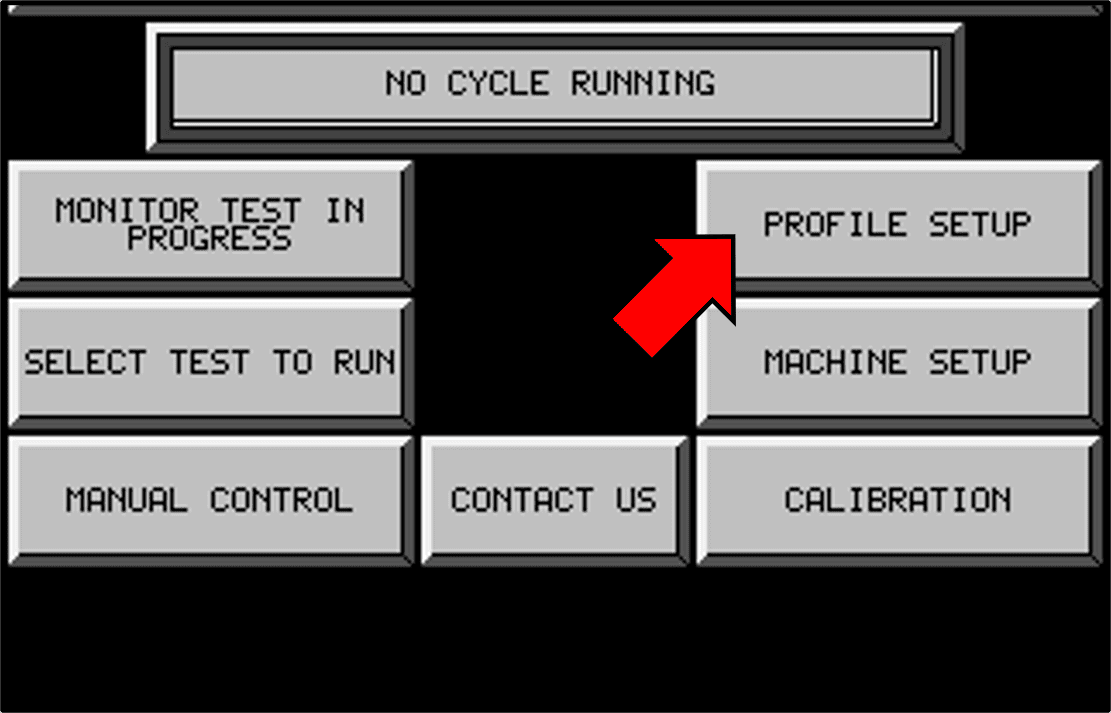
- On the touchscreen, press MAIN MENU → PROFILE SETUP.
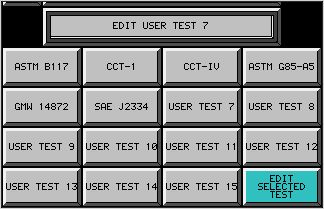
- Select an unused custom profile, such as USER TEST 8.
- Press EDIT SELECTED TEST.
Program Controller Step 1 — Fog
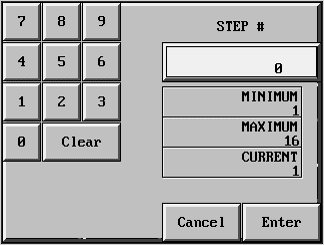
- Press STEP #, enter 1, and press ENTER.
- Press TIME, enter 60, and press ENTER.
- Press TEMP, enter 0, and press ENTER.
- Press EVENT, enter 1, and press ENTER.
Program Controller Step 2 — Dry-Off
- Press STEP #, enter 2, and press ENTER.
- Press TIME, enter 60, and press ENTER.
- Press TEMP, enter 35, and press ENTER.
- Press EVENT, enter 4, and press ENTER.
Program the Loop
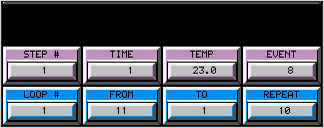
- Press LOOP #, enter 1, and press ENTER.
- Press FROM, enter 2, and press ENTER.
- Press TO, enter 1, and press ENTER.
- Press SET, enter the required number of additional repetitions, and press ENTER.
| Required Exposure | Total Fog/Dry Cycles | Enter in SET |
|---|---|---|
| 24 hours | 12 | 11 |
| 48 hours | 24 | 23 |
| 100 hours | 50 | 49 |
| 168 hours | 84 | 83 |
For another duration, calculate:
SET = total required cycles − 1Review and Start
- Confirm these entries:
| Controller Step | TIME | TEMP | EVENT |
|---|---|---|---|
| 1 — Fog | 60 minutes | 0°C | 1 |
| 2 — Dry-Off | 60 minutes | 35°C | 4 |
- Confirm LOOP # = 1, FROM = 2, TO = 1, and the required SET value.
- Press MAIN MENU → SELECT TEST TO RUN.
- Select the custom profile you programmed.
- Confirm its name appears in the status bar.
- Press START.
Automatic Completion
- The controller automatically stops after completing the final dry-off step of the programmed number of cycles.
2. Step-by-Step Instructions With Detailed Explanation
Manually Bypass the Bubble Tower
Locate the physical valves labeled B7 and B8.
- Close B7: position its handle perpendicular to the flow path through the valve.
- Open B8: position its handle parallel to the flow path through the valve.
These handle positions apply to standard quarter-turn ball valves. Use the valve labels to identify B7 and B8.
These are physical adjustments at the chamber—not touchscreen or software settings. Closing B7 and opening B8 routes atomizing air around the bubble tower. A5 uses atomizing air that has not been humidified by the bubble tower.
Open a Custom Profile
Press MAIN MENU → PROFILE SETUP.
Select an unused custom profile, such as USER TEST 8, then press EDIT SELECTED TEST. The controller opens PROFILE SETUP PAGE 2.
USER TEST 8–15 are custom-profile locations. Use an unused location so you do not overwrite another test.
Select Controller Step 1
Press STEP #, enter 1, and press ENTER.
This selects Controller Step 1 for editing. The TIME, TEMP, and EVENT values entered next all belong to Controller Step 1.
Whenever you select a numerical field, enter the value on the keypad and press ENTER to accept it. If you mistype a value, press CLEAR, enter the correct value, and press ENTER.
Set the Fog Duration
Press TIME, enter 60, and press ENTER.
TIME is entered in minutes. This programs the 60-minute fog period for Controller Step 1.
Set the Fog Temperature Entry
Press TEMP, enter 0, and press ENTER.
A5 relies on ambient room temperature during fog, with no heat applied to the cabinet. The chamber is not supposed to reach 0°C.
The 0°C entry is a low cabinet temperature setpoint intended to prevent the controller from calling for heat while the chamber follows ambient conditions. It is not a cooling target or a separately documented heater-OFF command.
If the controller will not accept 0°C, use a cabinet-temperature setpoint below the actual target ambient temperature so the controller does not call for heat during the fog portion.
Select Fogging for Controller Step 1
Press EVENT, enter 1, and press ENTER.
Event 1 = Fogging Cycle. This selects fog generation during Controller Step 1.
Because B7 is closed and B8 is open, the atomizing air is routed around the bubble tower during this fog period.
Select Controller Step 2
Press STEP #, enter 2, and press ENTER.
The controller is now editing Controller Step 2, which will be the dry-off portion of the A5 cycle.
Change the STEP # before entering the TIME, TEMP, and EVENT values for the second condition.
Set the Dry-Off Duration
Press TIME, enter 60, and press ENTER.
This programs the 60-minute dry-off period.
One 60-minute fog period plus one 60-minute dry-off period equals one complete two-hour A5 cycle.
Set the Dry-Off Temperature
Press TEMP, enter 35, and press ENTER.
This sets the cabinet temperature target to 35°C during Controller Step 2.
Select Dry-Off for Controller Step 2
Press EVENT, enter 4, and press ENTER.
Event 4 = Dry Cycle, also described as Compressed Air Purge in the manual’s custom-test table.
Use Event values 1 and 4 exactly as shown. Adding other event-option numbers can change the timing units or enable additional functions.
Fog and Dry-Off do not run at the same time. Controller Step 1 must finish before Controller Step 2 begins. Fogging and Dry are conflicting cycle conditions and should not be combined into one controller step.
Select Loop 1
Press LOOP #, enter 1, and press ENTER.
LOOP # identifies which loop instruction is being edited. It does not specify how many times the test repeats.
This profile uses Loop 1 to repeat Controller Steps 1 and 2.
Set FROM
Press FROM, enter 2, and press ENTER.
FROM identifies the controller step that finishes before the loop is executed.
Entering 2 means the controller completes Controller Step 2—the dry-off period—before looping back.
Set TO
Press TO, enter 1, and press ENTER.
TO identifies the controller step the program returns to.
Entering 1 sends the controller back to Controller Step 1—the fog period.
Controller Step 1: Fog → Controller Step 2: Dry-Off → Return to Controller Step 1If no loop is programmed, the controller does not run both conditions at once. It runs Controller Step 1 once, then Controller Step 2 once, and stops.
Set the Additional Repetitions
Press SET, enter the required number of additional repetitions, and press ENTER.
The controller runs the initial fog/dry cycle once, then performs the number of additional repetitions entered in SET.
SET = required total cycles − 1| Required Exposure | Total Two-Hour Cycles | Additional Repetitions: SET |
|---|---|---|
| 24 hours | 12 | 11 |
| 48 hours | 24 | 23 |
| 100 hours | 50 | 49 |
| 168 hours | 84 | 83 |
For example, for 100 hours, enter SET = 49:
- One initial fog/dry cycle.
- Forty-nine additional fog/dry cycles.
- Fifty complete cycles at two hours each.
Review the Profile
Confirm the controller steps:
| Controller Step | Condition | TIME | TEMP | EVENT |
|---|---|---|---|---|
| 1 | Fog | 60 minutes | 0°C | 1 |
| 2 | Dry-Off | 60 minutes | 35°C | 4 |
Confirm the loop settings:
| Field | Entry | Meaning |
|---|---|---|
| LOOP # | 1 | Edit Loop 1 |
| FROM | 2 | Complete Controller Step 2 before looping back |
| TO | 1 | Return to Controller Step 1 |
| SET | Total cycles − 1 | Number of additional repetitions |
Start the Profile
Press MAIN MENU → SELECT TEST TO RUN.
Select the custom profile you programmed. Confirm its name appears in the status bar, then press START.
The controller begins Controller Step 1, automatically proceeds to Controller Step 2, and then follows the programmed loop instructions.
Automatic Completion
After the initial fog/dry cycle and all additional repetitions entered in SET, the controller completes the final 60-minute dry-off period and automatically stops.
For example, SET = 49 produces 50 complete cycles, totaling 100 hours. No manual stop is required.
